
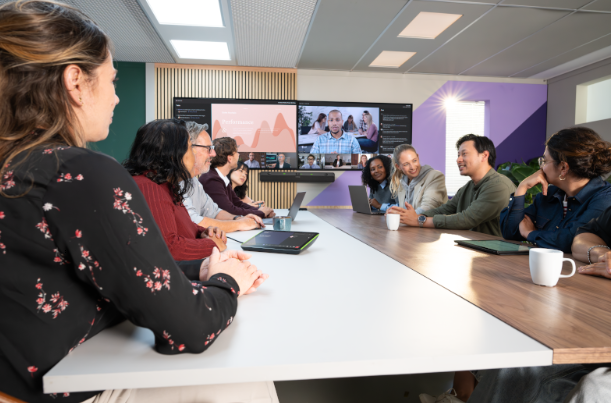
A meeting room can have a large display, a camera, and a table full of people—and still make collaboration difficult.
Remote participants struggle to hear someone at the far end. Employees hesitate before sharing content. IT keeps receiving support requests for the same room.
For businesses investing in hybrid work, these recurring problems deserve attention alongside the equipment budget.
Shure’s September 2026 collaboration updates bring several relevant developments into focus: the IntelliMix® Bar Pro, options for standardizing different room types, expanded warranty availability, and research connecting collaboration quality with technology ROI. For BCS Consultants clients, these updates offer practical starting points for improving meeting spaces.
Start With What Poor Meetings Cost Your Business
Meeting room costs continue after installation. Time spent troubleshooting, repeated explanations, and ongoing support requests all affect the value a room delivers.
Consider a hypothetical example: eight participants lose four minutes getting a meeting started. That represents 32 participant-minutes. If it happens across ten meetings each week, more than five hours of combined staff time go into getting connected.
That calculation does not establish the savings a particular upgrade will deliver. It does show why measuring recurring delays can make a business case more concrete.
Research highlighted by Shure supports looking at collaboration this way. In IDC’s Collaboration: The ROI Amplifier, published in September 2025 and sponsored by Shure, 71% of organizations said collaboration improves the return on their technology investments. The finding concerns collaboration broadly; it is not a promised return from a specific product.
Clear Audio Matters Beyond the Live Conversation
When participants are difficult to hear, the problem can carry into the meeting record.
AI transcription and summary tools depend on the information they capture. Incomplete speech or missing context can leave employees checking and correcting outputs that were intended to save time. Shure’s discussion of collaboration ROI identifies this relationship between meeting quality and AI usefulness.
For organizations adopting these tools, our practical takeaway is to evaluate the room’s audio alongside the software. Test ordinary conversations from every seating position, including quieter speakers and people facing away from the microphone.
Clear speech capture gives meeting tools better input. Employees should still review important summaries and action items.

A New Option for Medium and Large Microsoft Teams Rooms
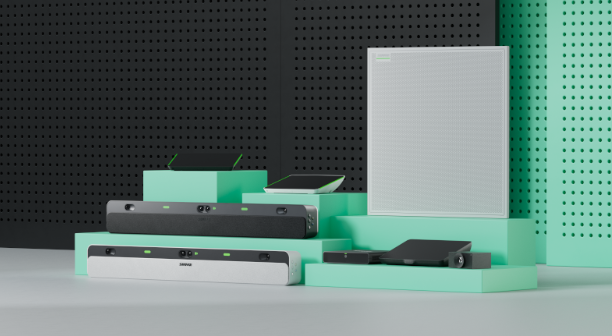
Shure’s IntelliMix Bar Pro Kit offers an integrated approach for medium-to-large Microsoft Teams Rooms.
The system combines array microphones, stereo loudspeakers, video cameras, and processing in a video bar, with a 10-inch touch panel included in the kit. Its features include:
- Four 4K cameras with a combined 135-degree field of view.
- IntelliMix View AI framing to adjust how participants appear.
- IntelliMix digital signal processing for speech enhancement and noise reduction.
- Remote monitoring and management through supported platforms, including ShureCloud.
- Microsoft Teams Rooms certification for medium-to-large spaces.
For businesses evaluating a room refresh, this creates another option to assess against the room’s requirements.
Room shape, seating distance, acoustics, display placement, and network readiness should guide that assessment. A product specification becomes useful when it is matched to how people actually meet.
Standardize the Experience Across Different Spaces
Employees benefit when starting a meeting feels familiar across the workplace. IT teams benefit when deployment and support follow consistent standards.
Shure’s collaboration portfolio provides several approaches:
| Approach | Where it can fit |
| IntelliMix Bar Pro Kit | Medium-to-large Microsoft Teams Rooms |
| IntelliMix Room Kits | Teams Rooms or Zoom Rooms deployments, with configurations for different room sizes |
| IntelliMix Foundation System | Customized spaces that require selected cameras, microphones, and other peripherals |
The Foundation System is particularly relevant when organizations need a common platform while adapting equipment to individual rooms or existing technology investments. Platform certification should be checked for the specific solution and configuration.
A useful standard defines the experience employees should expect: how they join, share content, adjust volume, and request help. Equipment selection can then account for each room’s physical requirements.

Include Warranty and Maintenance in the Plan
Shure’s September newsletter announced expanded extended-warranty availability for Microflex® Advance™ array microphones and the IntelliMix P300 Audio Conferencing Processor.
The optional extension adds three years to the applicable standard limited warranty, providing up to five years of total coverage. Shure’s published program requires purchase through an authorized channel partner within 60 days of the initial product purchase. Product eligibility, regional availability, and program terms apply.
These details belong in procurement planning, while purchase dates and registration information are readily available.
Ongoing maintenance also deserves an owner. The newsletter included software and firmware updates across several Shure product families. For deployed systems, establish a process to review relevant release notes, check compatibility, schedule updates, and verify room operation afterward.
Measure Whether the Experience Improves
Before an upgrade, document the problems that prompted it. After deployment, compare the same indicators.
Useful measures include:
- Time needed to start a meeting.
- Support requests associated with each room.
- Recurring audio or connection complaints.
- Room utilization and employee feedback.
- Corrections required in meeting transcripts.
Shure’s ROI discussion identifies these kinds of operational signals as ways to connect collaboration investments with business outcomes. They also help teams identify which rooms need further attention.
Bring the Room and the Technology Together With BCS Consultants
As a Shure partner, BCS Consultants helps organizations connect product choices with the needs of their meeting spaces.
Our video conferencing services cover room design, installation and integration, training, and support, with solutions for environments ranging from huddle rooms to boardrooms and training spaces.
Whether you are evaluating IntelliMix Bar Pro, planning a broader room standard, or addressing persistent audio problems, start with the experience your employees and remote participants need.
Ready to improve your meeting spaces? Contact BCS Consultants to discuss your video conferencing requirements.
You must be logged in to post a comment.